How to use Context7 mcp server
What is Context7?
Context7 is an open-source MCP server that provides real-time, version-specific documentation and code examples for over 50,000 libraries. It integrates seamlessly with AI tools like GitHub Copilot, Claude, or custom LLM agents.
Why use it?
- Eliminates hallucinations by providing accurate API references.
- Supports framework-specific docs (Vue, React, Next.js, Day.js, etc.).
- Works with IntelliJ, VS Code, and any MCP-compatible client.
How to use Context7 mcp server ?
You can play around on the main page of the project or simply use a curl to fetch the data You wish so look up :
context7.com/api/v2/docs/code/vuejs/pinia?topic=log&tokens=666
How to Configure Context7

How to use Context7 is really simple, just add a proper config entry and the plugin You use should pick it up instantly. Maybe reload the app if in need.
1. Install the Context7 plugin for your IDE (VS Code or IntelliJ).
2. Add the MCP server definition in mcp.json: JSON
{
“servers”: [
{
“name”: “context7”,
“url”: “https://context7.com/api”,
“apiKey”: “YOUR_API_KEY”
}
]
}
3. In your prompts or instructions, include: use context7 mcp This tells the AI to fetch documentation from Context7 before generating code.
How to test if Context7 is running ?
Use good`ol task manager and in details section You will find a ocmmand line entry similar to :

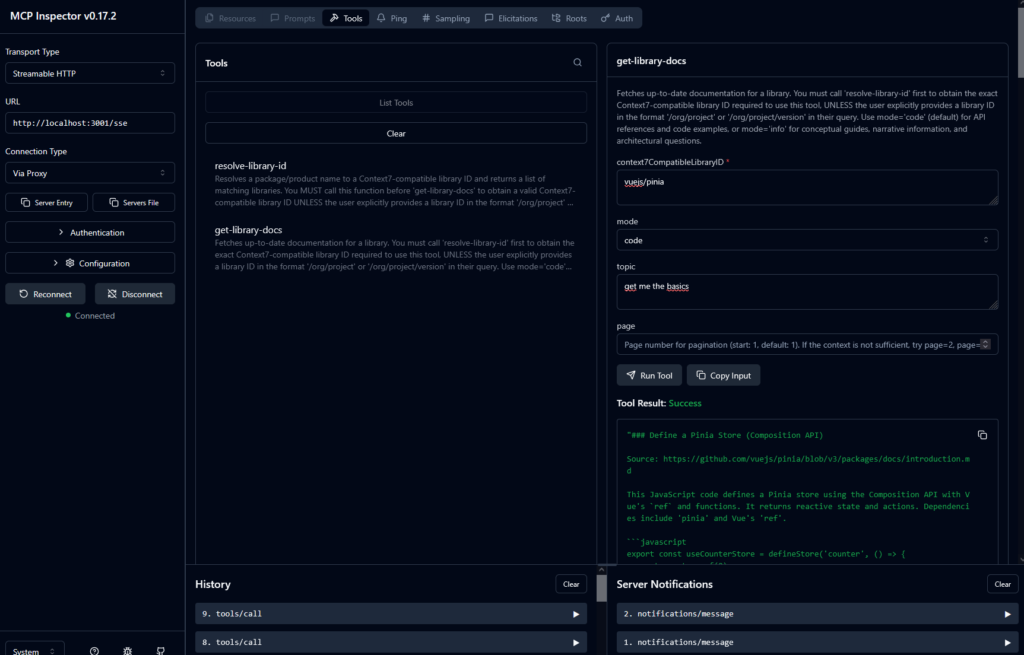
Additionaly You can run the mcp inspector locally :
npx -y @modelcontextprotocol/inspector npx @upstash/context7-mcp@latest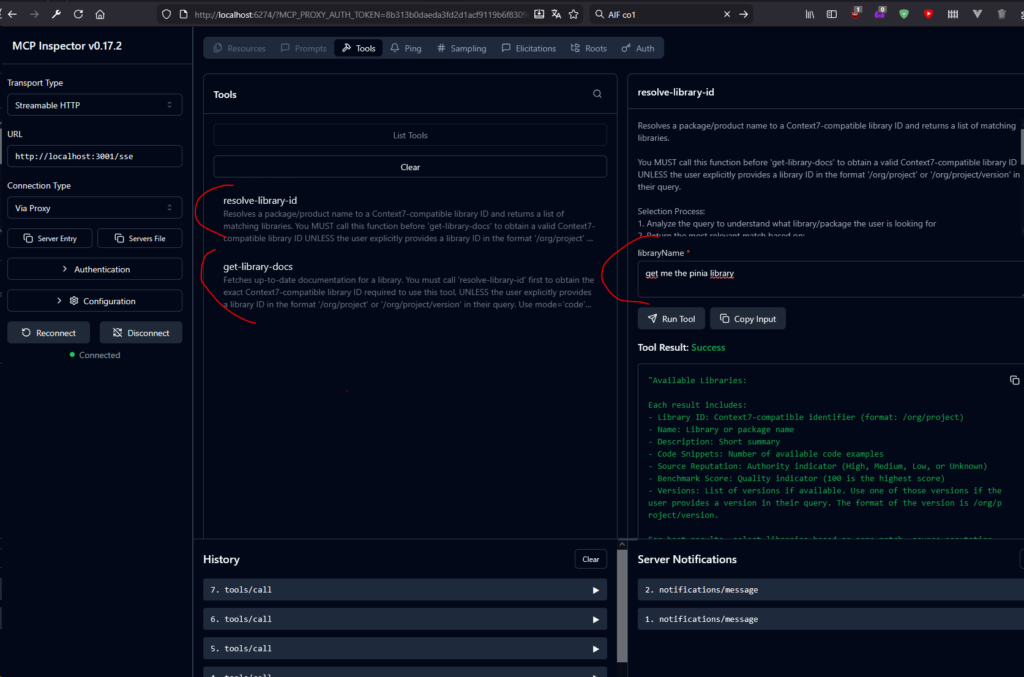
Supported Frameworks
Context7 works with JavaScript/TypeScript, React, Vue, Next.js, and many more. It’s ideal for projects where version accuracy matters. You can define Your llm / agent to use version based on the code You are working on:
- Frontend apps using
package.jsonfor dependency management. - Backend services using
build.sbt - Python code basing on requirements*.txt file
How Context7 works
Server utilizes two main endpoints:
- Vector search endpoint – library id
- Uses an augmented vector database RAG to find the library and version based on your query / instructions / project dependencies This retrieves precise documentation for the correct version, not some outdated APIs that once upon a time where high in search results.
- Documentation endpoint
- Provides curated documentation, FAQs, and code examples. All of these are injected into the models context window for use in code generation.
Fetching data
- Client Request (Prompt) → AI sends a query with instructions like “use context7 mcp”.
- Context7 Server: Vector Search → Finds the library using semantic similarity and version matching.
- Context7 Server: Fetch Docs → Retrieves curated documentation based on token limits.
- Inject Docs into AI Context → AI uses this data to generate accurate, version-aware code.
Token Considerations – mind the context window
Tokens matter because they define how much documentation you can load into the AI’s context window. In addition we need to remember that the context window of any LLM is pretty much like a conversations with any human. You tend to focus on the begining and the end, somethimes loosing the parts in the middle.
- Default response: ~10,000 tokens.
- Custom limit: You can request more or less using the
tokensparameter: TypeScript mcp_context7_get-library-docs(
context7CompatibleLibraryID: “/iamkun/dayjs”,
tokens: 5000 // Example limit
)
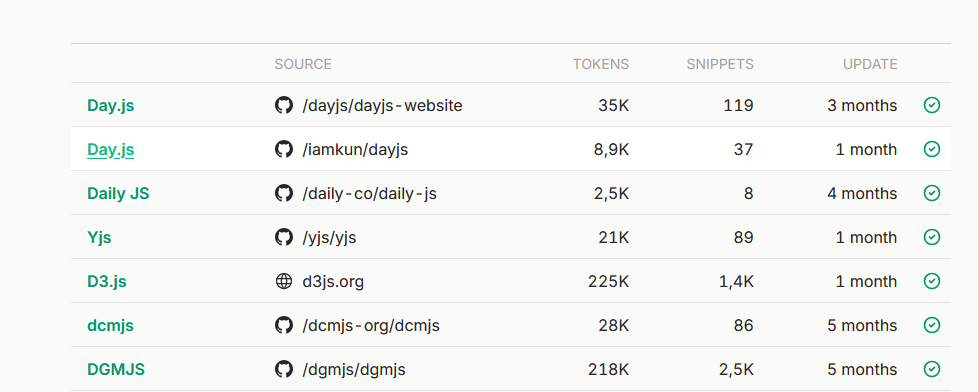
Why limit tokens?
- Full Day.js docs = 8900 tokens.
- Full TypeScript handbook = 150,000–250,000 tokens. Loading too much will consume your context window and overflow your context.
Best practice:
Start with 3-5,000 tokens for carefully curated docs (covers almostt 95% of usage) and keep some token space for your code, files and instructions.
How to use Context7 mcp server ? Carefulyl and mindfully. Your AI’s context window is finite. If you overload it with documentation:
- Quality drops due to diminishing returns.
- Your code and prompts get less attention. Rule of thumb:
Attach 3–5 key files and request curated docs, not full libraries.

Why It’s Efficient
Context7 uses curation protocol:
- Core methods (e.g.,
format,add,difffor Day.js). - Major plugins (UTC, timezone, duration).
- Real code examples.
- Internationalization patterns.
This ensures maximum value per token.
Final Summary
Context7 MCP server is a game-changer for AI-assisted coding. It connects your IDE and AI agent to real-time, version-specific documentation, reducing hallucinations and improving code accuracy. Configure it easily, choose the right token limit, and always consider your context window. With smart curation, you get the best of both worlds: accurate docs and efficient AI performance.