
Structure for instructions, agents and skills
This all is the provide a nice clean idea on how to store your files so You can make Your AI assistant / LLM network understand what and how to do. Acording to Your more or less strict rules. This should help You to achieve more repeatable results as expected.
The problem : generic answer
Do not confuse with generic functions, those rock ! Out-of-the-box, any LLM (here copilot) creates generic code. You could call it ‘vanilla’ flavour. It doesn’t know your conventions, library preferences patterns / anti patterns.
This results in something that might work but is hard to maintain, totally different then the rest of the lot and just creates a headache. You didn`t even start coding and already have to review stuff that doesnt work.
Maybe its a sign that those LLMs aren`t THAT good…
The solution: instructions
Provide instructions to it/him/her like a well aged recipe for Your favorite dish. Step by step, kaizen style, be precise, be detailed.
Organize your .github/ folder with three types of instruction files to guide your Copilot :
| File Type | Purpose | Answers |
|---|---|---|
| Instructions | Code standards & patterns | “WHAT should the code look like?” |
| Skills | Tool usage & search strategies | “HOW do I find information?” |
| Agents | Specialized personas | “WHO handles this task?” |
Start here
One main file that will always be loaded, copilot-instructions.md, that routes everything.
Folder Structure
Structure has 3 directories : instructions, agents and skills is simple. What You need to be aware of is to not duplicate or contradict Yourself in those instructions. Growing files means growing complexity. Be precise and technical.
.github/copilot-instructions.md– Point of entry, start. Rroutes across the files below.
instructions/default.instructions.md– Global rules (always loaded)frontend.md– Vue/React standardsbackend.md– API standardstesting.md– Test patterns
agents/frontend-developer.agent.mdcode-reviewer.agent.md
skills/context7-mcp.skill.md– external docs lookup via mcp- cve-checker.skill.md – checking security issues with libraries, might use some mcp server
local-packages.skill.md– node_modules inspection
Copilot work flow
Flow: User Prompt → Loader → Instructions + Agent → Skills → Code Output
- Loader activates – Reads file type, routes to correct instructions
- Instructions are merged– Combines global + file-specific rules
- Agents– Adds specialized knowledge on top
- Skills– Ads handling of particular use cases
- Output – Following all merged rules
How many tokens ?
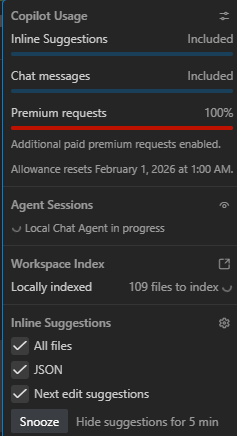
All that is beeing merged locally and then a huge prompt is send as a single request. It is important cause it is one premium request in the github copilot dictionairy so You get to pay 1 premium request. Tokens are no more a subject of matter (for copilots billing plan )
Priority Order (highest to lowest)
- Existing project code – Your codebase is the source of truth
- Critical rules – define in
default.instructions.md - File-specific instructions –
frontend.md,backend.md - Agent guidance –
frontend-developer.agent.md - External docs – downloaded from web or mcp servers
- General knowledge – LLM training
File template example
Just some of the examples, if You ask any model to deeply analyze your project, crawl some files, provide some guidance on edge case and methodologies it will create You a nice set of those instructions for You to adjust.
Instructions file example
Frontmatter:
description– Human-readable purposeapplyTo– Glob pattern (e.g.,frontend/**/*.vue)critical– Rules that must never be violated
Body sections:
- 🔴 Critical — Must-follow rules
- ❌ Never — Anti-patterns
- ✅ Always — Required practices
- Examples — Fallback code snippets
Agent File
Frontmatter:
name— IdentifierapplyTo— Auto-activation patternpriorities— Doc lookup order
Body:
- Responsibilities (3-5 bullets)
- Collaboration hints
Skill File
Frontmatter:
name— IdentifierapplyTo— Usually**/*(cross-cutting)
Body:
- When to use / never use
- Tool invocation flow
- Fallback strategies
Raw example
---
description: 'Vue 3 web-schedule development standards'
applyTo: 'frontend/**/*.vue, frontend/**/*.ts'
cache: session
---

# Frontend Standards - Vue 3

**Stack**: Vue 3.5+ • TypeScript (strict) • Quasar • Pinia • vue-i18n • Vite 7+

## 📁 Project Structure

```
frontend/src/modules/<feature>/
├── components/       # Vue 3 components
├── services/        # API calls (axios)
├── store/           # Pinia stores (if needed)
├── composables/     # Reusable logic (2+ uses)
├── types/           # TypeScript interfaces
└── views/           # Route views
```


## 🔴 Information Source Priority

1. **Existing project code** (ALWAYS FIRST)
2. **Default rules**: `.github/instructions/default.instructions.md` (CRITICAL: typing, i18n, security, no `any`)
3. **Fallback examples**: In this file when Context7 unavailable

## 🔴 CRITICAL

- **`<script setup lang="ts">` ONLY** - no Options API
- **TypeScript interfaces** for props/emits, explicit return types
- **Context comments only** - explain WHY, not WHAT
- **Global rules**: See `.github/instructions/default.instructions.md` (typing, i18n, security, no `any`)

## Project Patterns

### Component Structure
- Props: TypeScript interface with `defineProps<Props>()`
- Emits: TypeScript interface with `defineEmits<Emits>()`
- Explicit types on all refs, computed, functions

### Services
- Class-based with private `baseURL`
- Axios for HTTP
- Return typed data from methods
- Export singleton instance
ript definitions before using Quasar or custom components.

## ❌ Never

- `any` type or implicit types
- Options API
- Hardcoded text
- Missing `data-test-id`
- Unhandled errors
- `console.log` in production

---

## Fallback Examples (when Context7 MCP unavailable)
....
Key Takeaways
- ✅ Separate concerns – Instructions (what), Skills (how), Agents (who)
- ✅ Use
applyToglobs – Auto-route*.vue→frontend.md - ✅ Define critical rules – These never get overridden
- ✅ Prioritize existing code – Your codebase beats documentation
- ✅ Keep agents short – Reference instructions, don’t duplicate
- ✅ Document limitations – “Context7 doesn’t work for X”
Quick Reference
| Working on… | Loads | Agent |
|---|---|---|
| Vue components | default.md + frontend.md | @frontend-developer |
| Unit tests | default.md + testing.md | @test-writer |
| API endpoints | default.md + backend.md | @backend-developer |
Summary
Structure for instructions, agents and skills is something to be…. more or less… fire and forget. Just create them and analize. If You have some kind of benchmarks, thats even better, otherwise You will just have to develope a feeling for those instructions and outputs based on a lot of work.
On the other hand You should feel a huge change if You starting with this. It really should make Your life easier, worst case scenario You should have more code that You can use and less code that You need to refactor or re-prompt 🙂


