-
Dealing with github copilot errors
Dealing with github copilot errors is pretty irritating. Especially when dosing some more complex stuff and suddenly “Bam”. Red message. Easiest thing to do ? Switching the model family often works because some models have different capacity pools or stricter preview limits. GitHub documents vaguely that if you are rate limited, you can wait and try again. Just type “continue” and keep your fingers crossed. Otherwise check usage patterns, change the model, or contact support. Common github copilot errors Some run of the mill You probably know already, just put them together as a ‘review’ : Why changing the model helps ? Changing from one model family (vendor) to another…
-
Markmap vs Mermaid for Spec-Driven Development (SDD)
Markmap vs Mermaid for Spec-Driven Development You will consider sooner or later. When You have to go “full on AI” documentation stops being a nice-to-have and becomes a must be part of the product. We need to convey a lot of information, with hopefully as little text as possible so we can easily read it and digest the information. Two popular options for Markdown documentation features are Markmap and Mermaid. They solve different problems, and the best choice depends on whether you want fast idea mapping or more structured diagrams for flows. When to use Markmap Markmap turns Markdown headings and bullet points into an interactive mind map. Useful for…
-
WebExtension Manifest.json permissions options list
WebExtension Manifest.json permissions options list is quite long. Let us see what we can access with our plugin for FF. This hsould inspire You to write Your own for quality of life and ease of doing things… or avoid them all together. For avoidance i would highly recommend to look into prper ad block filter and creating / adding your own. Rule : Do not scare users Remember when Your app requires and asks for access. You either explain to user in every detail what for and go with bare minimum. Just as a rule of thumb of not beeing accused of getting and selling info. It is always scary…
-
How to reduce github copilot`s premium requests usage and maximize efficiency
How to reduce github copilots premium requests usage and maximize efficiency ? Make a plan, a kaizen plan at best. Instruct precisely, cover edge cases, allow all tools to execute and pray the LLM will understand You. Want to share my simple methodology that not only can save money but also ease in and smoothen out the workflow. RTFM ! As always You could benefit from RTFM ! Reading the foqing / friendly / flopsy manual. I know You never read it cause real man don`t do it ( how about real woman ? ) ? God knows if gamers would not have to go through the tutorial, they would…
-
Typescript perfect sync – 3 tricks to keep it tight
Typescript perfect sync can be kept using couple of strategies. Most of us start with simple union types, like this: const ScenarioStatus = 'success' | 'fail' | 'error' | 'other'; So far so good. That works great… until you need to iterate over those values for rendering, validation, or other logic. And now You are stuck with two separate definitions: one array for logic, and one string union for the type. Sooner or later, they’ll fall out of sync and provide headaches to people. You could go for en enum…. Below behold the three TypeScript tricks to make your code tight, hard to break, cleaner, safer, DRYer and resistant to…
-
Statics VS AI code analysis ~13 tools
Statics VS AI code analysis works best using the pros from both words. Go hybrid ! Static tools understand the syntext, hardcoded parameters and are very strict. On the other hand AI understands context, can figure out business logic, adapt the codebase. Logic flaws or performance bottlenecks rule-based scanners might miss, AI will put more effort into that. Static analysis limits Static tools scan for syntax errors, style violations, and basic security patterns using fixed rules. Always consistenst, very fast but might generate false positives, ignore business logic, and require manual rule overrides. How often did You use @typescript-error 🙂 Do You code for the linter to pass, logic to…
-
Code mode for mcp servers and llms
Code mode for mcp servers is about LLM writing and calling the code to use a proper MCP instead of calling it directly with the whole context. It makes the call a lot smaller, no overhead is passed, just the basics that are required to call the proper MCP method. Just as You do in code, method or a function, proper parameters, everything validated and… BAM ! We are returning a context that LLM uses in further stages. Anthropics wrote… This is really nice looking but only for a huge models with a 1kk tokens of a context. We need to remember that this is not possible on any kind…
-
How to use Context7 mcp server
What is Context7? Context7 is an open-source MCP server that provides real-time, version-specific documentation and code examples for over 50,000 libraries. It integrates seamlessly with AI tools like GitHub Copilot, Claude, or custom LLM agents. Why use it? How to use Context7 mcp server ? You can play around on the main page of the project or simply use a curl to fetch the data You wish so look up : context7.com/api/v2/docs/code/vuejs/pinia?topic=log&tokens=666 How to Configure Context7 How to use Context7 is really simple, just add a proper config entry and the plugin You use should pick it up instantly. Maybe reload the app if in need. 1. Install the Context7…
-
What is an MCP (Model Context Protocol) data format ?
A regular MCP (Model Context Protocol) format follows JSON-RPC 2.0 encoded in UTF-8 standard. The format is design to easily integrate different tools used with AI and LLMS like Context7 ( used by visual code or intellij). Servers like Context7 are designed to integrate real-time, version-specific documentation and code examples directly into AI or coding assistant prompts to improve code accuracy and developer productivity. MCP naming conventions MCP naming conventions are usually : use lowercase letters, hyphens, or camelCase without spaces or special characters. Example filenames : The folder structure may organize docs by library by topic, component or any other phrase or category: MCP documentation file format MCP Context7…
-
What LLM model to choose ? Check Models.dev
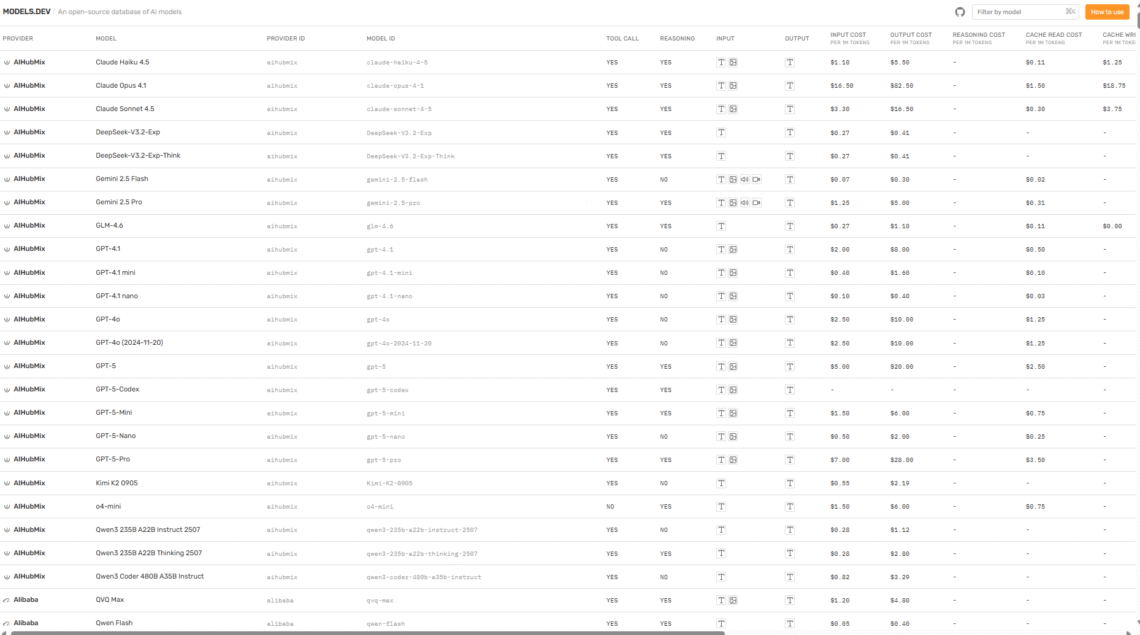
What LLM model to choose ? Considering its size, cost in cloud ( average), tokens per input and other parameters You really need to visit Models.dev — An open-source database of AI models. It is a great one stop shop for many many models to compare and figure out what would You like to use or maybe run locally on your graphic cards GPU 🙂 Huge list of models and it`s parameters How to Choose the Right Model When in doubt visit Models.dev that makes it easier to see all this info in one place so you don’t have to dig through a lot of technical stuff or paperwork. On…